*** Both communication modes in icROBOSim2026 — RS/COM Automation and UDP/IP Socket — support high‑speed communication. As in the following video, switching via the preference setting was only for convenience in capturing the comparison . ***
All posts by Peter.S
Camera Work
Camera Work – High quality Camera Work made easy for IronCAD
Camera Work Interpolation – Liner
Camera Work Interpolation – Catmull-Rom Splines
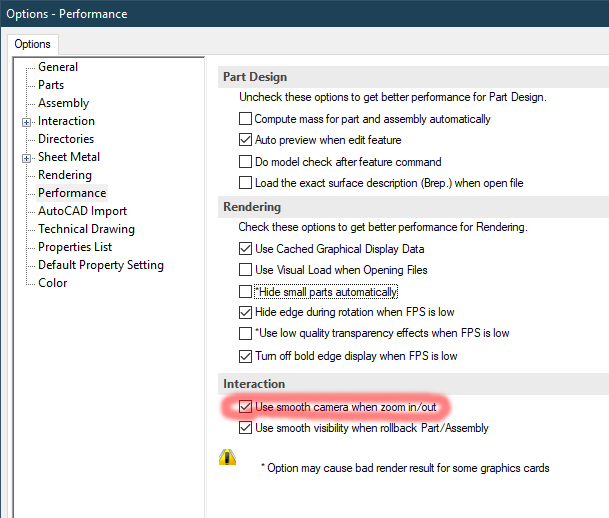
For IronCAD version before 2022 uncheck/disable the “Use smooth camera when zoom in/out”. Auto disabling for “Use smooth camera when zoom in/out” will be available after IronCAD 2022.
Relocate Robot Position
Relocate Robot Position – one pass calculation in combination of Offset X Y Z and Rotate Rx Ry Rz
FUNAC Singularity Control
Pick and Place (Conveyor)
Pick and Place (Rail)
Yaskawa Robot Code
Arc Point
Arc Point
Showcase
Element Animation
Sequence 01
3th Approach 06 SetSolving
3th Approach 05 Strength Test
3th Approach 04 RSSequencer
The birth of RSServer and RSSequencer
3th Approach 03 RC ToolBox
Integration with Misthbishi RC ToolBox
Intergration with MITSUBISHI RT ToolBox. As shown in the following video, the RT ToolBox is remotely controling the icROBOSim™ for debugging the robot program.
RC ToolBox Integration
3th Approach 02
3th Approach 01
2th Approach 03
Multi robot integration with Excel
2th Approach 02
2th Approach 01
Driven the icROBOSim™ by an external EXCEL Application.
Remotely Driving IRONCAD robot/object/element from an external Excel Sheet VBA. Showcase of an external program could communicate with the RSServer (IRONCAD add-in) via UDP/IP protocol. RSServer as an IronCAD robosim server with the capability to handling multi client commutating at the same time – by all means, multiple external client/sequencer/remote programs could be ruining at the same time to trigger any desire robot/object/element within IronCAD 3DScene.
2th Approach Excel Integration